
Inside:
 Product Information
Marketing
Material
Forecast Form
Affiliate Management
Affiliate
Manual
Sales Tips
Contact Us:
ISP Alliance Sales
(770) 888-8900
6230 Shiloh Rd. Ste 200
Alpharetta, GA 30005
Marketing Plan Management
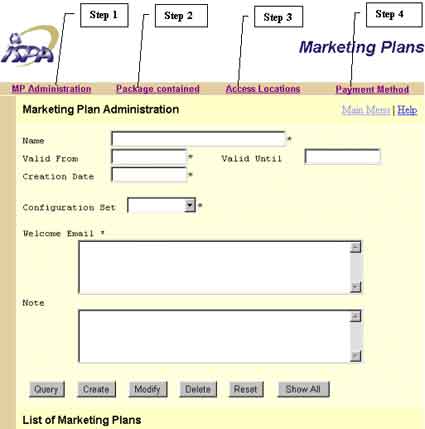
A marketing plan is a way for the affiliates to organize it's deals depending on their different marketing targets. For example, an affiliate can create marketing plans for the general public and another marketing plan for students, each with a different monthly fee.
Creating a new Marketing plan
Step 1
First you must name the marketing plan, enter
two dates for the validity of the marketing plan, and the creation date of the
marketing plan. Choose the default configuration set, then write a welcome email.
The note field is there for you to write a special comment about the marketing
plan and is for your own use.
Step 2
The next thing
that you will have to do is place a package that you will be offering in this
marketing plan. To do so, click on the "Packages Contained" link on the
header bar located at the top of the screen. Select the package out of the drop
down menu box at the top, Fill in the "From" email address field, a subject, and
content for the email. Next is to enter in the payment terms and the fees. Click
on the "Create" button at the bottom of the screen.
Step 3
Next, go to the "Access Locations" Link located on the header
bar to the right of the "Packages Contained" link, Select the access locations
that you wish to include in the marketing plan in the drop down menu box and clicking
on the "Add" button after each one. To remove an access location, place
a check in the box and click on "Delete".
Step 4
Your final step is to select the payment methods that you wish to accept with
this marketing plan, i.e. American Express, Visa, etc. Go to the "Payment Methods"
link at the top header bar and select the payment methods and click on the "Add"
button after each one, again, if you need to remove a payment method, just place
a check in the box to the right of the payment method and click on the "Delete"
button.
To query an existing marketing plan, type in the name of the marketing plan, then click on the "Query" button or just click on "Show All".
To modify or delete an existing marketing plan, first query the marketing plan, then click on "Modify" or "Delete".


Send questions and
comments about our site to webmaster@ispalliance.net
©
Copyright © 2000 ISP Alliance, Inc. All rights reserved. | Y2K
/ Legal Information