
Inside:
 Product Information
Marketing
Material
Forecast Form
Affiliate Management
Affiliate
Manual
Sales Tips
Contact Us:
ISP Alliance Sales
(770) 888-8900
6230 Shiloh Rd. Ste 200
Alpharetta, GA 30005
Packages
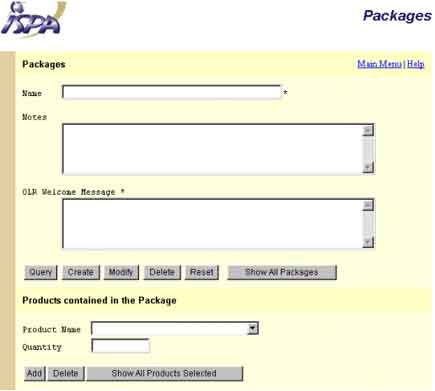
This screen allows you to manage the packages. It is divided in two parts. In the first one, you have access to the specific information about the packages. The second one is reserved for the products contained in the package.
To create a package, fill in all the required information on the screen under "Package", click on the "create" button. Next select the products that you want to include in the package under "Products contained in the Package" section including the product name and the quantity, then click the "Add" button.
To query an existing package, type in the package name and click "query" or click on "Show all Packages". Once you have queried the package, click on "Show all Products Selected" button at the bottom of the screen.
To modify or delete a package and all of it's contents, first query the package, then click on "Modify" or "Delete".


Send questions and
comments about our site to webmaster@ispalliance.net
©
Copyright © 2000 ISP Alliance, Inc. All rights reserved. | Y2K
/ Legal Information