
Inside:
 Product Information
Marketing
Material
Forecast Form
Affiliate Management
Affiliate
Manual
Sales Tips
Contact Us:
ISP Alliance Sales
(770) 888-8900
6230 Shiloh Rd. Ste 200
Alpharetta, GA 30005
Affiliate Management User
Affiliate Management Users
To add, modify, delete, or query an affiliate management user, simply click on the "Affiliate Management User" link on this screen.
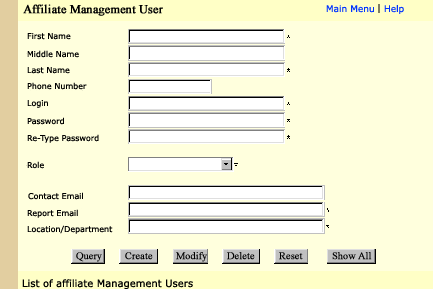
To add a user, type in all the necessary information on the form that is marked with an (*), and click on "Create". If you leave out any necessary information, an error message will appear to let you know that all the fields were not filled out correctly.
To query an existing Affiliate Management User, type either their first and last name or login and click on the "Query" button at the bottom of the screen.
To modify and existing Affiliate Management User, you must first query the user, make any modifications that you need and click on the "Modify" button. To delete a user, you must first query the existing user, click on the "Delete" button at the bottom of the screen.
Note: The "Role" field contains roles to be assigned to the users. Roles limit how much access the user will have to the system, Aff Administrator being the most access, Aff oper lvl 1 having the least amount of access.


Send questions and
comments about our site to webmaster@ispalliance.net
©
Copyright © 2000 ISP Alliance, Inc. All rights reserved. | Y2K
/ Legal Information