
Inside:
 Product Information
Marketing
Material
Forecast Form
Affiliate Management
Affiliate
Manual
Sales Tips
Contact Us:
ISP Alliance Sales
(770) 888-8900
6230 Shiloh Rd. Ste 200
Alpharetta, GA 30005
Change Account

Type The Change Account Type screen allows for the modification of existing accounts. You can change both the Marketing Plan and the Package that the customer was created under in three steps.
To modify a customer, click on the Change Account Type screen, and query the customer. Once the customer's information comes up, you will see this screen:
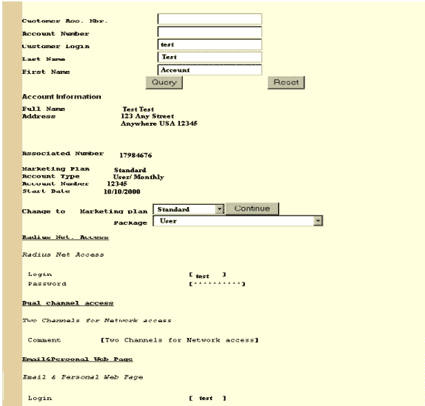
Once you have changed the Marketing Plan and the Package type that you want to change the customer to, click Continue.
You will then be taken to the screen below.
This screen will give you specific information on what will be changed on the account, and what services will stay the same.
If there are any open fields on this screen, make sure that they are filled out.
Once the fields that you want to change have been filled out, click on Update the Account, and the new services will be provisioned into the account, and Affiliate Management will reflect the changes that you have made.


Send questions and
comments about our site to webmaster@ispalliance.net
©
Copyright © 2000 ISP Alliance, Inc. All rights reserved. | Y2K
/ Legal Information