
Inside:
 Product Information
Marketing
Material
Forecast Form
Affiliate Management
Affiliate
Manual
Sales Tips
Contact Us:
ISP Alliance Sales
(770) 888-8900
6230 Shiloh Rd. Ste 200
Alpharetta, GA 30005
Merge Screen
The merge Screen will give you the option to merge all of the similar accounts in your customer base.
When you enter the Merge Screen, you will only the have the options of Affiliate Name and Select. Your domain name will be defaulted into the Affiliate Name spot, so just choose Select.
You will then be given the option of clicking on a letter in the Alphabet to merge by. For example, if you wanted to merge all of the John Smith's in your customer base, you would click on "S" to pull up all of the Smiths.
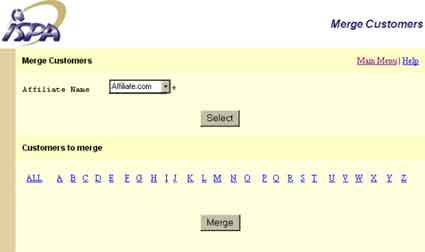
There will be check boxes by each customer account. To merge the accounts, simply put a check by the names you wish to merge, and click the Merge button at the bottom of the screen. This will convert all of the formerly separate accounts and give them the same database information, such as the first, middle, and last names, address, and phone numbers.


Send questions and
comments about our site to webmaster@ispalliance.net
©
Copyright © 2000 ISP Alliance, Inc. All rights reserved. | Y2K
/ Legal Information